
Mounts
The Mounts section has separate tabs for directory mounts and Devices. Device access uses its own permissions and host allowlist.
Mounts make a directory from the host machine available inside your server's container at a fixed target path, useful for things like shared plugin folders or common asset directories.

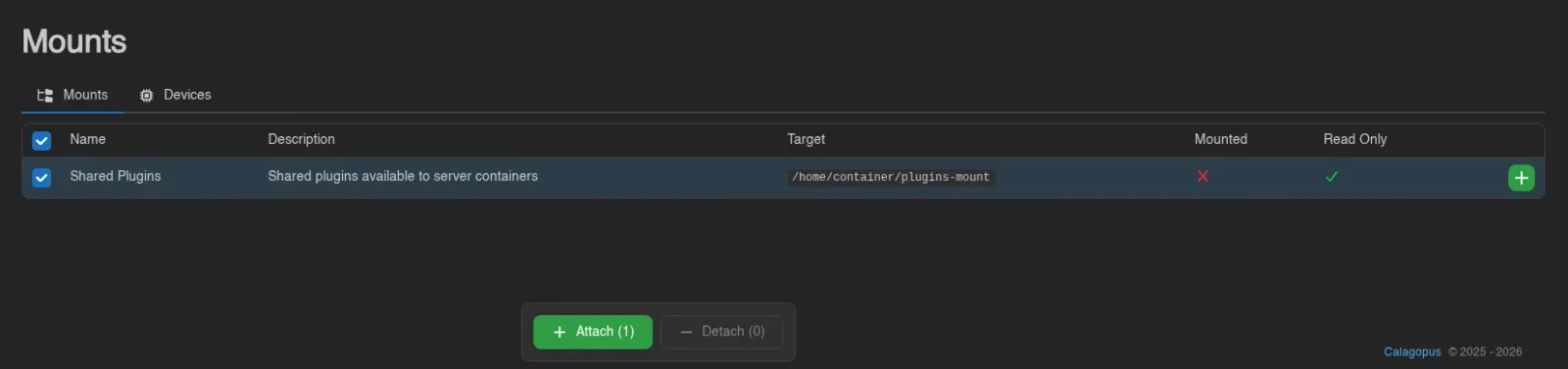
The table lists every mount available to your server: Name, Description, Target (the path inside the container, e.g. /home/container/plugins-mount), Mounted, and Read Only.
Use the green + at the end of a row to attach a mount, or the red - to detach one. Both ask for confirmation first ("Do you want to attach name to target?") and confirm with a toast once done.
Select rows with their checkboxes, by dragging across them, or with Ctrl+A (Esc clears); only rows on the current page are selected. Attach and Detach in the action bar then work on the whole selection, each skipping mounts already in that state; Detach asks for confirmation first. Each action reports how many items it changed, skipped or failed in a toast.
INFO
Users only toggle mounts on and off. Which mounts exist, where they point, and whether they are read-only is defined by administrators under Mounts, and every mounted path must also be whitelisted in the node's allowed_mounts Wings setting.
Attaching and detaching are gated by the mounts.attach and mounts.detach permissions, viewing by mounts.read. See the Permissions Reference.