
Mounts
Mounts make a directory on a node's host machine available inside server containers at a fixed path, for example a shared plugins or assets folder. This page (Storage > Mounts) is where you define them; users attach and detach them from their server's Mounts page.
The list shows each mount's ID, Name, Source (the path on the host, e.g. /srv/mounts/plugins), Target (the path inside the container, e.g. /home/container/plugins-mount), and Created.

Creating a Mount
Click Create in the top right.
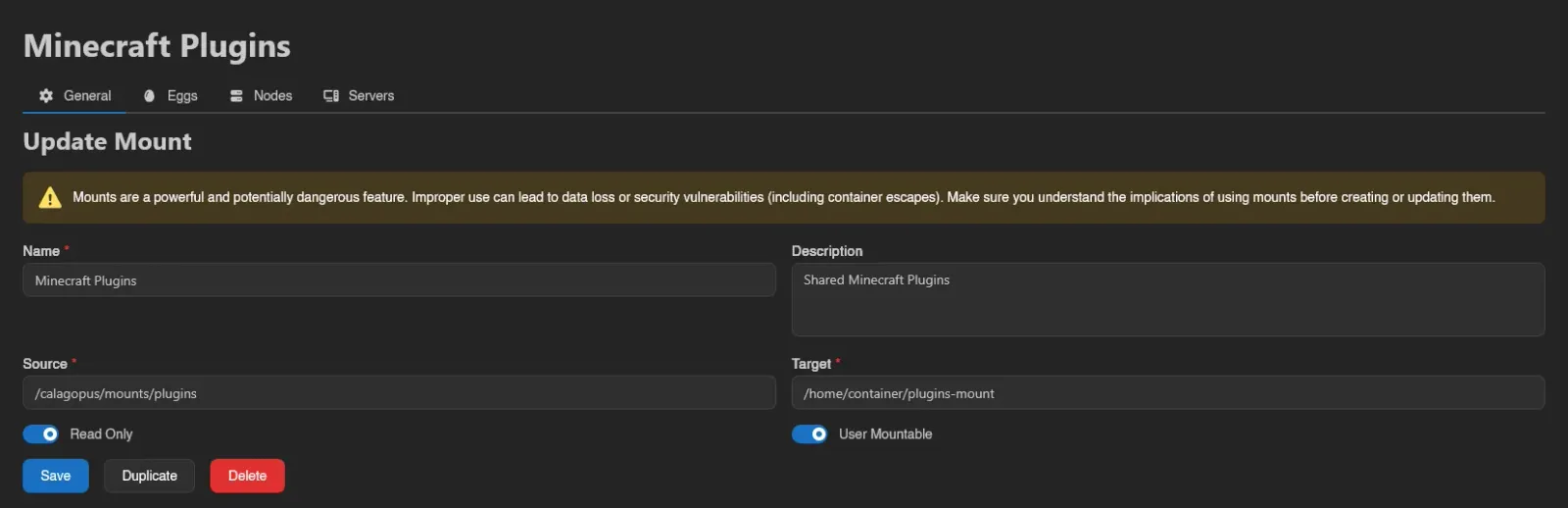
| Field | Meaning |
|---|---|
| Name | Display name shown to admins and users. |
| Description | Optional, shown on the user-facing mounts table. |
| Source | Directory on the host machine. |
| Target | Path inside the container where the source appears. |
| Read Only | Mounts the directory read-only inside the container. |
| User Mountable | Lets users attach and detach the mount themselves. |
WARNING
Mounts are a powerful and potentially dangerous feature. A badly chosen source path can lead to data loss or security vulnerabilities, including container escapes. Make sure you understand the implications before creating one.

Finish with Save, or Save & Stay to keep creating.
WARNING
Defining a mount in the panel is not enough on its own: Wings refuses any mount whose source is not whitelisted in the node's allowed_mounts setting. Add the source path there on every node that should serve the mount.
Eggs, Nodes, and Servers
Opening a mount shows four tabs: General (the edit form, plus Duplicate and Delete), Eggs, Nodes, and Servers.
Eggs and Nodes control eligibility: use Add to assign the mount to an egg or node, and right-click a row for Remove; both lists are searchable. A mount can only be attached to a server whose node and egg are both assigned here.


Servers is a read-only, searchable list of every server the mount is currently attached to, with the same columns as the Servers list.

How Mounts Reach Users
For a mount to show up on a server's user-facing Mounts page, all three must be true: User Mountable is on, the server's node is assigned, and the server's egg is assigned. Mounts that are not user mountable can still be attached by an admin from the server's Mounts tab in the admin server view, as long as the node and egg are eligible.
Managing mounts requires the mounts.create, mounts.update, and mounts.delete admin permissions; the egg and node assignment tabs use eggs.mounts and nodes.mounts. See the Permissions Reference.
Node Allowlist Feedback
Node assignment views show Checking... while reading the node configuration and Not Allowed when the mount source does not match Wings' allowed_mounts entries. Update that node's local allowlist before expecting the attachment to work. Assignment dialogs also warn about rejected sources.
This check compares configured paths. It does not resolve symlinks on the node or prove that the source exists; an absent warning is not a host filesystem check.