
Translating Calagopus with Crowdin
This guide explains how to contribute translations using Crowdin.
Prerequisites
You will need:
- A Crowdin account
- Basic understanding of both English and your target language
Joining the Project
- Open the Calagopus Crowdin project.
- Sign in to Crowdin.
- Select the language you want to translate.
- Click
en.json. This indicates the source, not the target language.
If your language is not available, open a GitHub issue requesting support for it.
Understanding the Translation Interface
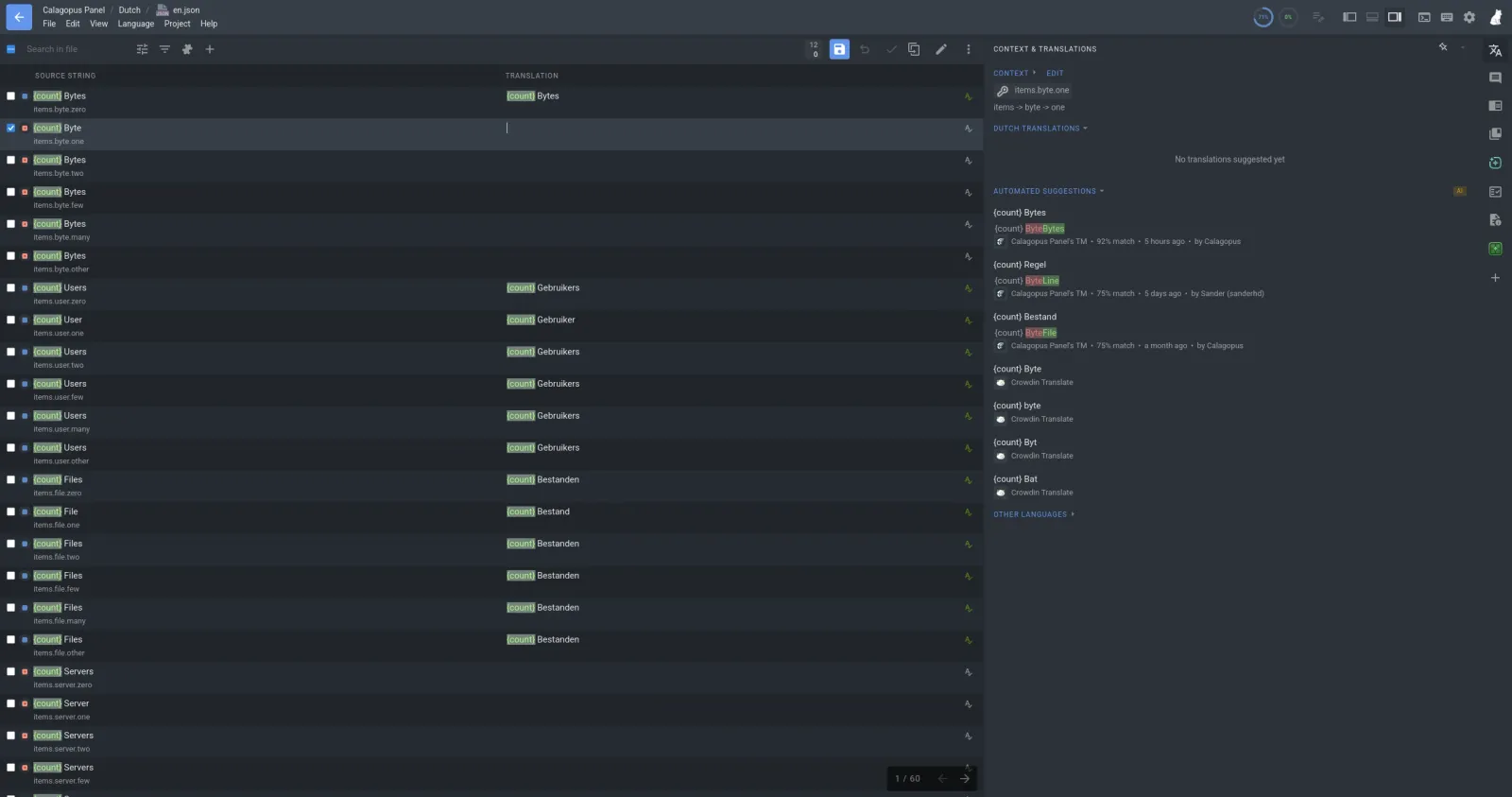
Each source string consists of:
- Source string - The original English text.
- Translation - Where you enter your translation.
- Suggestions - Existing translations or machine translation suggestions.
- Comments - Context from developers or other translators.
Always read the surrounding context before translating. Automated suggestions may be incorrect; review them before submitting.
Translation Guidelines
Keep Meaning, Not Words
Translate the intent of the message rather than performing a literal translation.
Preserve Variables
Strings often contain placeholders.
Example:
Welcome back, {username}!Translate only the surrounding text.
✅ Correct
¡Bienvenido de nuevo, {username}!❌ Incorrect
¡Bienvenido de nuevo, {nombre}!Never translate or modify text inside {}.
Preserve Markdown
Some strings contain Markdown formatting.
Example:
Click **Save** to continue.Translate only the visible text.
Haz clic en **Guardar** para continuar.Do not remove:
**bold**_italic_- Links/URLs
- Line breaks
Plural Forms
Some languages have multiple plural rules. Translate every required plural form.
Consistency
Use consistent terminology throughout the project. Avoid using multiple translations for the same technical term.
Reviewing Existing Translations
Before translating a string:
- Read previous translations.
- Check translation memory suggestions.
- Vote on good translations.
- Improve incorrect ones.
Proofreading
Before saving, verify:
- Grammar
- Spelling
- Punctuation
- Variables are unchanged
- Markdown is preserved
What Should Not Be Translated
Generally leave these unchanged:
- Product names (e.g. Calagopus, Docker, GitHub, PostgreSQL)
- Linux commands
- Environment variable names
- File names
- URLs
Machine Translation
Machine translation can be a useful starting point, but every suggestion should be reviewed by a human. Ensure translations sound natural to native speakers.
Need Help?
If you are unsure about a translation:
- Leave a comment on the string in Crowdin.
- Ask other translators.
- Open a discussion or issue on GitHub.