
Firewall
The Firewall page controls who is allowed to reach this server's allocations. It lives under Network as a second tab, at /server/<id>/network/firewall, and needs the firewall.read permission to view and firewall.update to change.
An administrator can switch the firewall off for a server through an egg configuration. The Firewall tab is then hidden, and any rules you already had are kept but no longer enforced until it is switched back on.
With no rules configured, the page tells you as much: "Every connection to this server's allocations is allowed. Add a rule to start restricting who can reach it." Nothing is filtered until you add the first rule.
How Rules Are Evaluated
Rules are checked from top to bottom, and the first one that matches decides. That makes the order they sit in as important as the rules themselves; drag a rule by its grip handle to move it.
Anything that matches no rule at all is allowed. The page warns about this:
Traffic that matches none of these rules is allowed. Add a deny rule at the bottom that matches everything to turn this into a default deny firewall.
The Deny Everything Else button next to that warning appends a deny rule with no protocols, no sources and no ports, so it matches everything the rules above it didn't. Put your allow rules above it and the server is closed by default.
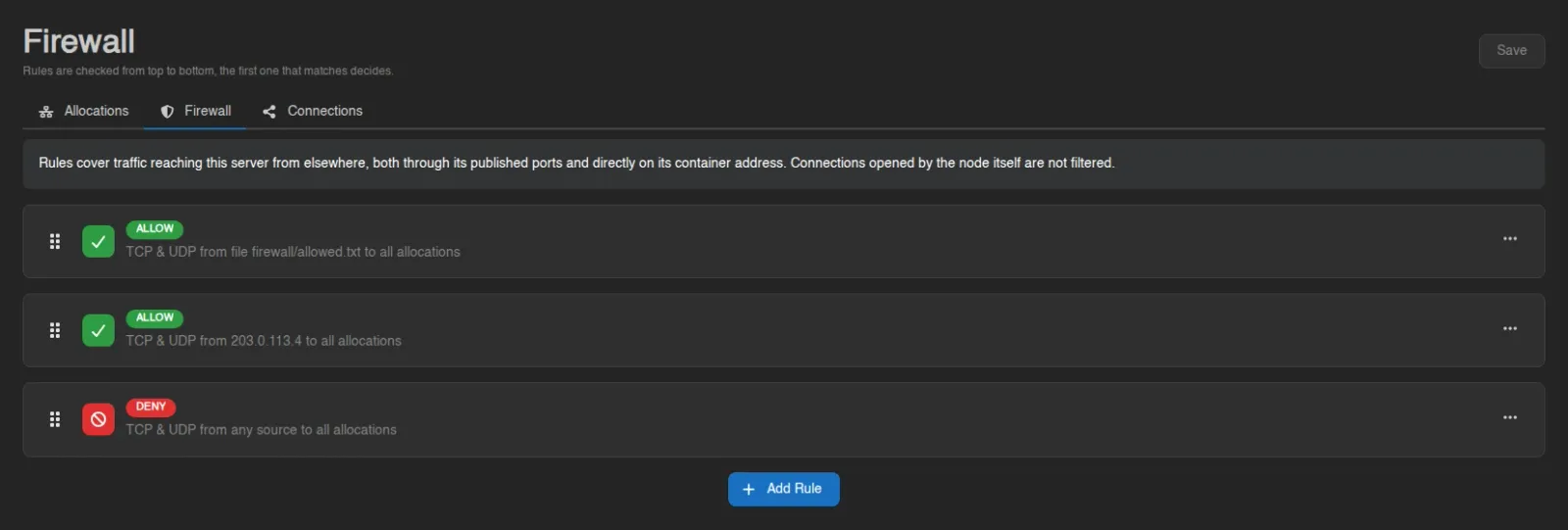
The ruleset above does exactly that: one rule allowing whatever a source file lists, one allowing a single address, and a catch-all deny beneath them.
Rule Fields
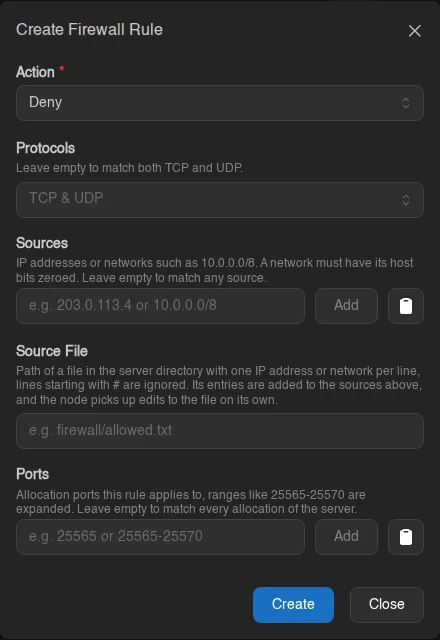
Add Rule opens a modal with five fields. An empty field means "match everything", so a rule with nothing filled in matches all traffic.
| Field | What it does |
|---|---|
| Action | Allow or Deny the traffic this rule matches. |
| Protocols | TCP, UDP, or both. Leave empty to match both. |
| Sources | IP addresses or networks such as 10.0.0.0/8. A network must have its host bits zeroed, so 10.1.0.0/8 is rejected while 10.0.0.0/8 is fine. Leave empty to match any source. |
| Source File | Path of a file in the server directory, such as firewall/allowed.txt, whose entries are added to the sources above. See Source Files. |
| Ports | Allocation ports the rule applies to. Ranges like 25565-25570 are expanded into individual ports. Leave empty to match every allocation of the server. |
Each rule card summarizes itself in the form protocols from sources to ports, falling back to "TCP & UDP", "any source" and "all allocations" for the empty cases. A source file shows up in that summary as file firewall/allowed.txt. Right-click a rule to edit, or use its card menu to remove it.
Source Files
A rule can take its sources from a text file inside the server directory instead of the modal, one IP address or network per line. Blank lines are skipped and everything after a # is a comment, so a file may look like this:
# staff
203.0.113.4
10.0.0.0/8  # office
2001:db8::/32
The file's entries are unioned with the rule's inline sources, so a rule with a file and no inline sources matches only what the file lists. A rule with a source file is never a catch-all, even with everything else left empty.
The node reads the file itself. Edit it any way you like, including from the game server, and the node picks the change up within a few seconds. Lines that do not parse are skipped, and the server console reports how many entries were loaded each time the file changes. When the file is missing or cannot be read, the rule keeps the entries it last loaded and the console says so. A file with no valid entries at all does clear the list.
The path is relative to the server directory and cannot leave it. The panel never reads the file, so the same rule on two servers uses each server's own copy. To share a list, copy the file to the other servers.
INFO
Each node caps the size of a source file. By default a file may hold 10000 entries and 1 MiB, set through docker.firewall.source_file_max_entries and docker.firewall.source_file_max_bytes in the Wings configuration. A file over either cap is not loaded at all and the previous entries stay in place.
Saving
Nothing you do on this page reaches the server until you press Save. Adding, editing, removing and reordering only change the pending list. An alert appears while you have unsaved work ("You have unsaved changes. Nothing is applied until you save."), and navigating away asks for confirmation before discarding it.
Import and Export
The page header has an Export menu and an Import button next to Save.
Export downloads the current ruleset as firewall-<server id>.json or .yml, in the same shape Import accepts. It exports the rules as they sit on the page, including unsaved edits, and is greyed out while there are no rules. Viewing the page is enough to export; only Import needs firewall.update.
Import accepts a .json, .yml, or .yaml ruleset, either through the file picker or by dragging the file anywhere onto the page ("Drop some files here to import as Firewall Rules").
WARNING
Importing replaces every rule, it does not merge into what is already there. If you have unsaved changes, a Replace Unsaved Rules dialog warns you first; otherwise the swap happens immediately.
An import only fills the pending list, exactly like editing the rules by hand, so nothing reaches the node until you press Save ("Firewall rules imported. Review them and save to apply them."). A file is rejected before it touches the page if it holds more rules than the server may have, or if any rule lists more sources than allowed, both set under Settings > Server.
Because a ruleset carries no server-specific identifiers, exporting from one server and importing into another is the way to copy a firewall between servers. Mind the source file paths when you do: the path travels with the rule, but the file itself does not, and each server reads its own copy.
Warnings You May See
On top of the default-allow notice above, the page raises these:
| Alert | Meaning |
|---|---|
| Not enforced | "This node will not enforce firewall rules. Rules are saved but have no effect, and this server may refuse to start while any are configured." The node either runs Wings rootless or has its firewall backend disabled. Don't leave rules configured on a node like that. |
| Shadowed rule | "Rule N can never match, an earlier rule already covers everything it does." Harmless, but that rule is doing nothing; reorder or remove it. |
| Unallocated ports | The ruleset names ports that aren't allocated to this server. The node ignores them until matching allocations exist. |
| Limitations | "Rules cover traffic reaching this server from elsewhere, both through its published ports and directly on its container address. Connections opened by the node itself are not filtered." Traffic arriving over a private connection is not filtered either; that connection is its own access grant. |
INFO
How many rules a server may have, and how many sources each rule may list, are set by the administrator under Settings > Server. Whether a node can enforce rules at all depends on its Wings configuration.