
System Backup Policies
System backup policies (Storage > System Backup Policies) take backups automatically on a schedule, without users or per-server schedules being involved. A policy covers a set of servers, runs on a cron schedule, and cleans up after itself with retention rules.
A policy backs up one of two things, chosen by its Backup Kind: the files of every covered server, or the contents of every database instance of every covered server. The kind decides what the policy can be scoped to, so it is fixed when the policy is created.
The list shows each policy's ID, Name, Schedule (the cron expression), Backups (how many it has taken), and Created. Next to the name sit its badges:
- Server or Database for the backup kind.
- Retention (hover it to see the rules, the same tooltip backup groups use) or No retention rules.
- Disabled on disabled policies.
- Run pending while a run is due.
Use the search box to filter.

Creating a Policy
Click Create in the top right.
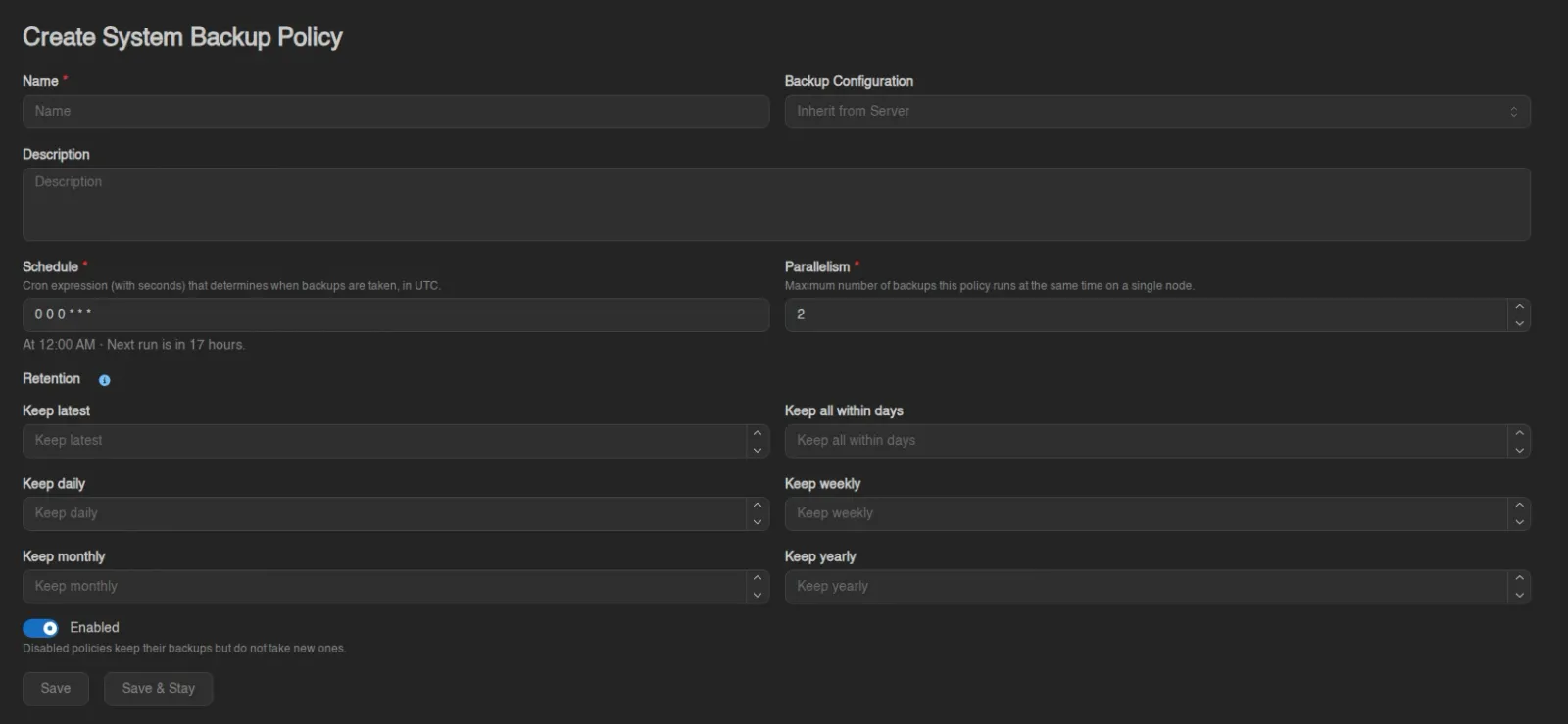
| Field | Description |
|---|---|
| Name / Description | Display name and optional free text. |
| Backup Kind | Server archives the files of each covered server. Database dumps each covered database instance. The choice is locked once the policy exists, because it decides which scopes apply. |
| Backup Configuration | Which backup configuration the policy's backups are written to. Defaults to Inherit from Server, the same resolution a manual backup would use. |
| Schedule | "Cron expression (with seconds) that determines when backups are taken, in UTC." The field has a helper popover for building the expression segment by segment, describes the current expression in plain English underneath, and previews when the next run would be. |
| Retention | Six rules deciding which of the policy's backups survive: Keep latest, Keep all within days, Keep daily, Keep weekly, Keep monthly, and Keep yearly, each off when empty or 0. They work as they do for backup groups, and the field has a helper popover describing them. The rules apply per server, and for a database policy separately to each database instance. |
| Parallelism | "Maximum number of backups this policy runs at the same time on a single node." Database policies apply the same number per database agent host instead, since the dump is read from the host rather than the node. |
| Enabled | "Disabled policies keep their backups but do not take new ones." |
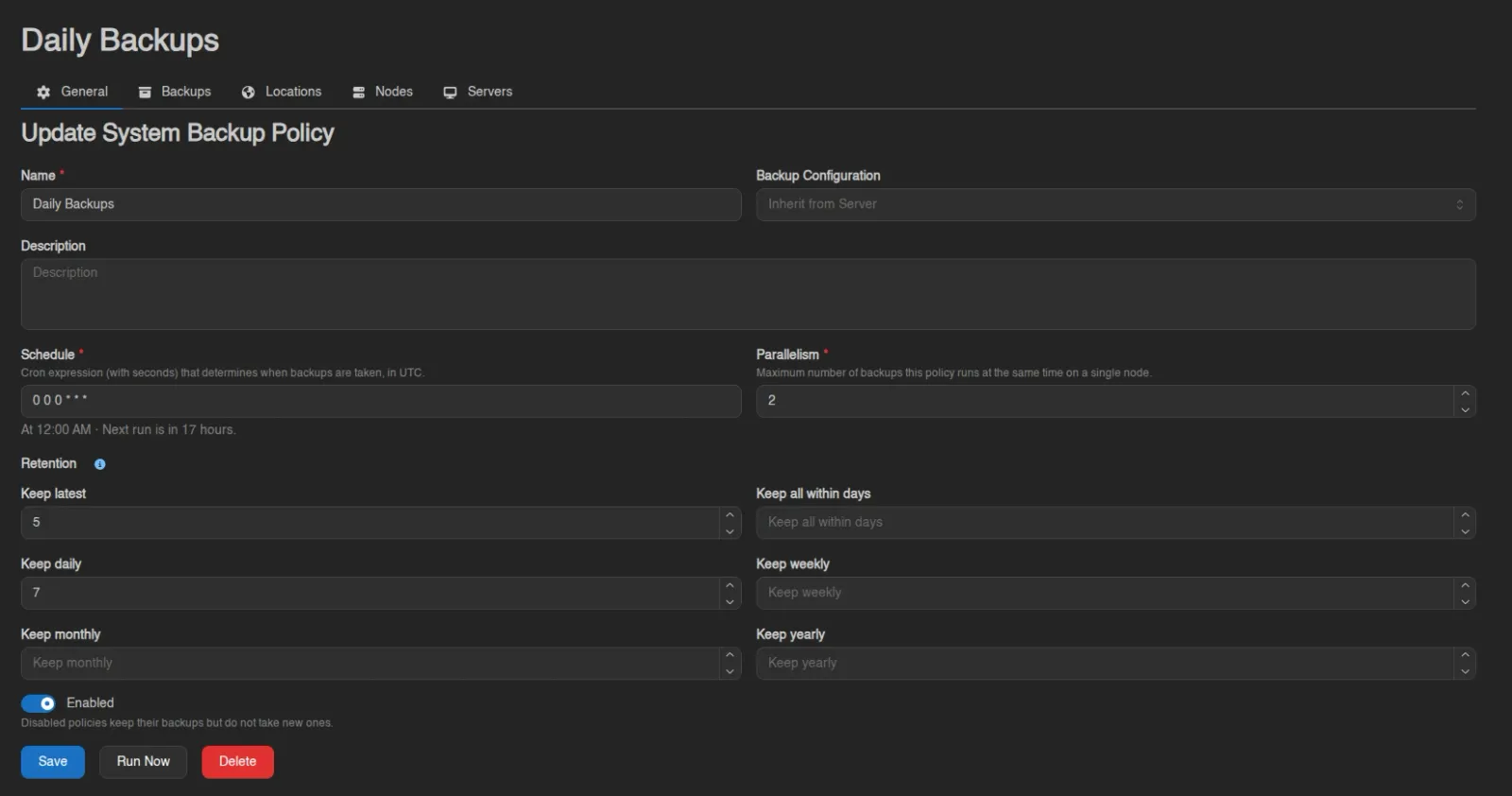
An existing policy also offers Run Now (after a Confirm Manual Run dialog; every covered target without a backup from this run yet gets backed up, and covered targets are processed oldest-attempt first) and Delete. The pending run clears once every covered target has been attempted or deliberately skipped, so a node in maintenance or a stopped database instance does not leave the run pending forever.
What Is Covered
A server policy has Locations, Nodes, and Servers tabs; a database policy has Locations, Database Agent Hosts, and Servers. Each tab has an Add button and right-click Remove.
For a server policy, a server is covered when it matches any of the three: it sits in an assigned location, runs on an assigned node, or is assigned directly.
For a database policy, a database instance is covered when its database agent host is assigned directly, when that host belongs to an assigned location, or when the instance's server is assigned directly.
Covered is not the same as backed up on every run:
- Servers that are mid-transfer or in a status like installing or restoring are skipped for that run.
- Nodes in maintenance mode are skipped entirely.
- Database policies also skip an instance when its host is in maintenance mode, when it's restoring a backup, or when its container isn't running, since a dump is taken through the running database.
- A database policy also skips any server whose backup configuration resolves to btrfs or zfs, which cannot store dumps.
Due-ness is tracked per target (the cron having fired since that server's or that instance's last policy backup), so skipped or newly added targets catch up on the next tick.



Backups
Backups
The Backups tab lists every backup the policy has taken, searchable: Name, Server, Node, Checksum, Size, Files, Retention, and Created, each row tagged with a SYSTEM badge and carrying a download action. A database policy adds a Kind column, and its rows report no file count because a dump is a single file.
Policy backups do not count towards each server's backup limit and no backup group touches them; the policy's own Retention rules manage them instead, re-checked once an hour. Unlocked failed attempts are cleaned up 24 hours after they finish.
When there are failed backups, a Delete Failed button appears above the table (requires nodes.backups), showing how many it would remove. It asks for confirmation, keeps locked backups and any whose configuration is in maintenance, and runs in the background. A Force switch removes them even when the configuration is missing or the remote storage is unreachable, at the risk of leaving orphaned files behind.

Deleting a Policy
Deleting asks whether to also delete the policy's backups (Do you want to delete backups created by this policy?):
- Switch on: "All backups created by this policy will be permanently deleted from their storage backends."
- Switch off: "Backups created by this policy will become regular server backups. They will count towards each server backup limit and follow standard rotation." Released backups belong to no group, so no retention rule applies to them afterwards.
INFO
The buttons on these pages follow the system-backup-policies.* admin permission keys (create, read, update, delete, backups). See the Permissions Reference.