
Classic Databases
Classic databases are single databases provisioned on a shared database host, the familiar setup from other panels. They count toward the server's shared database limit; see Databases for how the limit and the tab bar work when your server also has managed databases.
The Databases tab lists each database's name, type (MySQL, PostgreSQL, or MongoDB), address, username, size, and whether it's locked. Click the address to copy it.
Creating a Database
Click Create. Pick a Database Name and a Database Host; hosts are grouped by database type, and a host marked Under Maintenance can't be selected. The button is disabled with a tooltip once the shared limit is hit, or with "No hosts found" when there's nothing to provision on.
INFO
Database hosts are set up by administrators and attached to locations, see Database Hosts. Users only ever pick from the hosts made available to their server.
Connection Details
Right-click a database and choose Details to open the Database connection details modal: database name, host, username, password, and a ready-made JDBC Connection String in the form jdbc:mysql://<username>:<password>@192.0.2.1:3306/<database>.
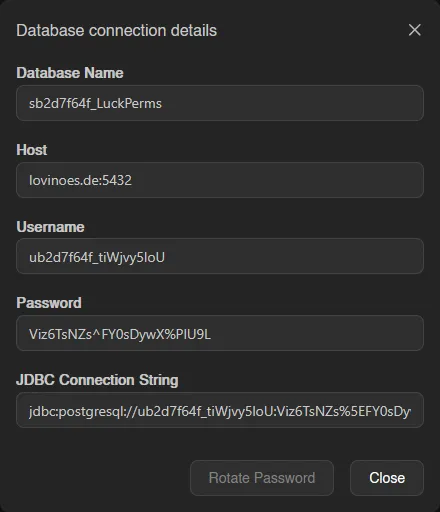
The password is only visible with the databases.read-password permission. From the same modal, Rotate Password generates a new password immediately, invalidating the old one.
Editing, Recreating, and Deleting
The rest of the right-click menu:
| Action | What it does |
|---|---|
| Explore Data | Opens the Data Explorer. |
| Edit | Toggle Locked. A locked database can't be recreated or deleted, and its password can't be rotated. |
| Recreate | Wipes all data and creates a fresh, empty database with the same connection details. Type the database name to confirm. |
| Delete | Permanently deletes the database and all data. Type the database name to confirm. |