
Email Templates
Calagopus sends emails for things like password resets, account creation notifications, and SMTP connection tests. Each of those emails is rendered from a template - a chunk of HTML with MiniJinja placeholders for variable substitution. By default the Panel ships its own templates baked into the binary, but operators can override them through the admin UI (different brand voice, different language, different layout entirely if they want), and extensions can register their own templates so that emails their extension sends are subject to the same override flow as the core ones.
That last part is what this page is about. If your extension sends emails - notification when a backup completes, alerts when a server hits a resource limit, custom welcome flow - you should ship your email content as a template rather than hardcoding the HTML in your Rust code. That way operators can customize it, and your extension fits into the same admin UI everyone already knows how to use.
What a Template Looks Like
A template is a small Rust struct: an identifier, a list of available variable names, a default subject line, the default body content as a string (typically include_str!'d from an HTML file in your extension's source tree), and whether the template is enabled by default. You don't store templates yourself - the Panel manages persistence. You just declare them and the framework handles the override-and-fall-back machinery.
use shared::extensions::email_templates::EmailTemplate;

EmailTemplate {
    identifier: "dev.0x7d8.test.welcome",
    available_variables: vec!["user", "invite_link"],
    default_subject: "{{ settings.app.name }} - Welcome",
    default_content: include_str!("../mails/welcome.html"),
    default_enabled: true,
}
The five fields, in order:
identifieris a&'static strthat uniquely names this template. It's how your code looks the template up later when sending an email, and it's how the admin UI keys overrides in the database. Identifiers are global across the whole Panel - core templates and every extension share one namespace - so prefix yours with your package name (e.g.dev.0x7d8.test.welcome, not justwelcome) to avoid collisions.available_variablesis aVec<&'static str>listing the variables your template can use. This is metadata for the admin UI - it shows operators which variables are available to put into the template - not enforcement. The actual rendering uses whatever variables the calling code passes. A reference to an undefined variable renders as nothing, but reaching into one ({{ usr.name }}with a typo inusr) fails the render, and the send is logged or propagated as an error. Keep this list accurate so operators editing the template have something to work from.default_subjectis the email subject line, as a MiniJinja template string. It supports the same{{ variable }}syntax as the body -{{ settings.app.name }}works here just as it does in the body content. Operators can override the subject through the admin UI independently of the body.default_contentis the template body, a MiniJinja-formatted HTML string. It's&'static strbecause it's typicallyinclude_str!'d from a file in your extension at build time. Operators can override it through the admin UI; if no override is set, your default is used.default_enabledcontrols whether the template is enabled out of the box. Iffalse,send_templateandsend_template_foregroundsilently skip sending when no operator override is in place. Use this for opt-in notifications (e.g. "server installed" alerts) where most operators probably don't want the email unless they actively turn it on.
INFO
Every template implicitly gets a settings variable in addition to whatever you declare - it's the Panel's app settings, accessible as {{ settings.app.name }}, {{ settings.app.url }}, etc. Two things happen automatically: settings and language are appended to your available_variables list during finalization (so they show up in the admin UI even if you didn't list them), and it's injected into the rendering context by send_template / send_template_foreground at send time. Don't pass settings yourself in the context: the framework registers it as a template global, and a context value with the same name shadows the global, so you would replace the real settings with whatever you passed.
Registering Templates
Templates are registered through the initialize_email_templates method on your Extension trait, which gets handed an ExtensionEmailTemplateBuilder:
use shared::{
    State,
    extensions::{
        Extension,
        email_templates::{EmailTemplate, ExtensionEmailTemplateBuilder},
    },
};

#[derive(Default)]
pub struct ExtensionStruct;

#[async_trait::async_trait]
impl Extension for ExtensionStruct {
    async fn initialize_email_templates(
        &mut self,
        _state: State,
        builder: ExtensionEmailTemplateBuilder,
    ) -> ExtensionEmailTemplateBuilder {
        builder.add_template(EmailTemplate {
            identifier: "dev.0x7d8.test.welcome",
            available_variables: vec!["user", "invite_link"],
            default_subject: "{{ settings.app.name }} - Welcome",
            default_content: include_str!("../mails/welcome.html"),
            default_enabled: true,
        })
    }
}
The builder method is add_template(template) -> Self, returning the builder so you can chain multiple registrations. There's no separate "list of all templates" - each call adds one.
Duplicate identifiers are silently dropped
If you call add_template with an identifier that's already registered (by core or by another extension that loaded before yours), the call is a silent no-op - the existing template wins, your call has no effect. There is no error, no log message, no panic. Pick a unique identifier (prefix with your package name) and you'll never hit this.
The directory layout most extensions use looks like this:
backend/
  mails/
    welcome.html # MiniJinja template, included via include_str!
    variables/
      en.json # variable defaults, included via include_dir!
      de.json # translations, one file per language
  src/
    lib.rs # registers the templates in initialize_email_templates
Storing the templates as separate .html files (rather than inline string literals) keeps the Rust code readable.
Writing the Template Content
Template content is a MiniJinja template - close to Jinja2 if you've used Python templating, with the same {{ variable }} and {% control %} syntax. A minimal welcome email might look like:
<p>Hello {{ user.name }},</p>

<p>Your account at {{ settings.app.name }} is ready to go.</p>

<p>
  Click <a href="{{ invite_link }}">here</a> to set a password and log in.
  This link expires in {{ user.invite_expiry_hours }} hours.
</p>
{{ user.name }} and {{ user.invite_expiry_hours }} use field access - MiniJinja can dot-walk into structs that get serialized into the rendering context. The shape of user is whatever the sending code passed; if you registered available_variables: vec!["user"] and your sender passes user => some_user_struct, the template can access any of that struct's serialized fields. {{ invite_link }} is a simple string variable; {{ settings.app.name }} is the implicit settings variable, accessible without you passing anything.
Default templates should be in English
The default_content you ship with your extension should be written in English, regardless of where you or your users are. Don't try to ship multiple language variants by registering separate identifiers per language; that just creates fragmentation that operators can't sensibly customize. If you want your mails translated, keep the layout in the template and move the wording into variables, which carry a value per language.
Variables and Translations
Every mail is rendered in the recipient's language. The template itself stays one HTML document. The wording that changes with the language lives in variables, small MiniJinja fragments the template references as {{ vars.<name> }}. A variable has an English default and optional translated defaults. Operators can override any of them per language, or add their own, from the same admin page that edits the template.
The easiest way to ship them is a directory of JSON files, one per language, embedded with include_dir (a workspace dependency, add include_dir = { workspace = true } to your extension's Cargo.toml). en.json declares the variables and their English defaults, keyed by template identifier; every other <language>.json carries translations for the same keys. This is exactly how the panel ships its own defaults, so you can crib the layout from shared/mails/variables/ in the panel source.
{
  "dev.0x7d8.test.welcome": {
    "subject": "Welcome",
    "greeting": "Hello <strong>{{ user.username }}</strong>,",
    "button": "Set a password"
  }
}const MAIL_VARIABLES: include_dir::Dir<'_> = include_dir::include_dir!("$CARGO_MANIFEST_DIR/mails/variables");
builder
.add_template(EmailTemplate {
identifier: "dev.0x7d8.test.welcome",
available_variables: vec!["user", "invite_link"],
default_subject: "{{ settings.app.name }} - {{ vars.subject }}",
default_content: include_str!("../mails/welcome.html"),
default_enabled: true,
})
.add_template_variables(&MAIL_VARIABLES)Add as many language files as you like. A translation file may also carry keys for the core templates (password_reset, two_factor_code and so on), which is how an extension can ship a language the panel does not translate itself. Translations for a variable nothing declares are logged and skipped, and a directory can be registered more than once without duplicating anything.
Variables can also be declared one at a time on the builder. The first argument scopes the variable to a template identifier; None makes it a global variable every template can use.
builder
    .add_template_variable(Some("dev.0x7d8.test.welcome"), "subject", "Welcome")
    .add_template_variable(
        Some("dev.0x7d8.test.welcome"),
        "greeting",
        "Hello <strong>{{ user.username }}</strong>,",
    )
    .add_template_variable_translation(
        Some("dev.0x7d8.test.welcome"),
        "greeting",
        "de",
        "Hallo <strong>{{ user.username }}</strong>,",
    )
The template then reads:
<p>{{ vars.greeting }}</p>

<p>Your account at {{ settings.app.name }} is ready to go.</p>
A few rules for variables:
- Names are lowercase letters, digits and underscores, starting with a letter, at most 64 characters. Invalid names are logged and dropped at registration.
- Values are MiniJinja fragments rendered with the same context as the template, so
{{ user.username }}and{{ settings.app.name }}work inside them. For the body they are rendered with HTML auto-escaping and inserted as safe HTML; for the subject they are rendered as plain text. A variable can reference another one as{{ vars.<name> }}, one level deep: a chain of three renders the innermost as empty. - Resolution order for a recipient language is: the operator's value for that language, the operator's English value, your translated default for that language, your English default. Once an operator customises a variable in English, that wording is what every language without its own override receives.
- Template variables shadow global ones with the same name.
add_template_variableis a no-op if the variable already exists,mutate_template_variable(Some(identifier), name, |variable| ...)changes an existing one, mirroringadd_templateandmutate_template.
The core templates each declare a subject variable plus greeting, intro, button, note, footer and a few template-specific ones; look at shared/mails/variables/en.json in the panel source for the full list. Their translations are maintained through the panel's Crowdin project, so if you want to reword a core mail without replacing its layout, mutate_template_variable is the tool.
Two globals are always available in templates and variables besides settings: language, the language code the mail is rendered in, and (in the body only) subject, the rendered subject line. subject is deliberately left out of the admin UI's variable list, since it exists only while the body renders - an operator who puts it in the subject field gets nothing back.
Sending an Email Using Your Template
Sending an email uses state.mail.send_template (fire-and-forget) or state.mail.send_template_foreground (awaits and propagates errors). Both methods look up the template, check whether it's enabled, resolve the subject and body (applying any operator overrides), and then send:
use shared::{
    State,
    response::{ApiResponse, ApiResponseResult},
};

async fn send_welcome_email(
    state: &State,
    user: &shared::models::user::User,
    invite_link: &str,
) -> Result<(), anyhow::Error> {
    state
        .mail
        .send_template(
            state,
            "dev.0x7d8.test.welcome",
            user,
            minijinja::context! {
                user => user,
                invite_link => invite_link,
            },
        )
        .await;

    Ok(())
}
Note the absence of ? on the send_template call - it returns nothing meaningful (it spawns a tokio task and any failure is logged from inside the task). If you use send_template_foreground instead, you'd propagate errors with .await?.
The four arguments to send_template / send_template_foreground: the State, the template identifier, the recipient, and the MiniJinja context for variable substitution.
The recipient is anything that converts into a MailRecipient, which pairs an address with the language to render in. Pass &user and the mail goes to the user's address in the user's language. Pass a bare CompactString address and the panel's default language is used. MailRecipient::new(address, language) covers the case where the address and the language come from different places, like a verification mail for an address the user has not confirmed yet.
A few notes on this pattern:
- The subject comes from the template, not your code. Both the subject and body are stored in the template and can be overridden by operators. The subject is itself a MiniJinja template string, so
{{ settings.app.name }}and other variables work there too, and it is rendered as plain text rather than HTML. - If the template is disabled, the send is silently skipped.
send_templatereturns immediately with no error;send_template_foregroundreturnsOk(()). Atracing::debugmessage is emitted so you can see it in logs. Checkdefault_enabledon your template definition if you're wondering why emails aren't sending. - The 15-second cache still applies. Template content and the enabled/disabled state are cached from the database for 15 seconds. A save from the admin UI invalidates the cache on the instance that handled it, so that instance sees the change at once; other instances behind a load balancer, and edits made straight in the database, take up to 15 seconds to show.
send_templatevssend_template_foregroundis about who handles failures.send_templatereturns almost immediately and spawns a tokio task for the actual send - SMTP errors, network errors, and rendering errors are logged from inside the task and the user-facing request is unaffected.send_template_foregrounddoes everything in your async context and propagates errors back. Usesend_templatefor fire-and-forget notifications; usesend_template_foregroundwhen the send result actually matters to your code (e.g. an SMTP connection test, where the whole point is to know whether it worked).
Overriding Core Templates
You can also modify a template the core Panel ships, rather than registering a new one. The use case here is narrow but real: maybe you ship an extension that customizes a deployment's email branding (say, replacing the default password-reset template with one that matches your customer's brand), and you don't want to make every operator manually paste content into the admin UI.
Use mutate_template for this:
async fn initialize_email_templates(
    &mut self,
    _state: State,
    builder: ExtensionEmailTemplateBuilder,
) -> ExtensionEmailTemplateBuilder {
    builder.mutate_template("password_reset", |template| {
        template.default_subject = "Password Reset - My Brand";
        template.default_content = include_str!("../mails/branded_password_reset.html");
    })
}
mutate_template finds the template by identifier and runs your closure against it, letting you change any field - default_content (the most common case), default_subject, or default_enabled. If no template with that identifier exists, the closure is silently skipped.
The core templates available for mutation in 1.2.3 are:
account_created- sent when a new user account is created. Variables:user,reset_link.password_reset- sent when a user requests a password reset. Variables:user,reset_link.email_verification- sent when a user must confirm an email address (on registration or an email change). Variables:user,email,verification_link.two_factor_code- sent when a user requests an email two-factor login code. Variables:user,code.session_created- sent when a session is created for a user, on any successful login. Variables:user,ip,user_agent,sessions_link. Disabled by default.connection_test- sent by the admin SMTP test feature. No variables (other than the implicitsettings).added_to_server- sent when a user is added as a subuser to a server. Variables:user,server,server_link.removed_from_server- sent when a user is removed as a subuser from a server. Variables:server.server_installed- sent when a server finishes installing. Variables:user,server,server_link. Disabled by default.server_restored- sent when a server backup is restored. Variables:user,server,server_link. Disabled by default.
Don't extend available_variables on a core template
The variables list reflects what the calling code actually passes when sending. If you add "server_count" to the password_reset template's variable list but the password-reset code path never passes a server_count, operators will see it in the UI as available but every reference to it in their template will render as nothing. If you need extra variables, register your own template under a new identifier instead and use it from your own code.
Mutating core templates is a sharp tool - it changes behavior other parts of the Panel and other extensions depend on. Same general guidance as mutating core permissions or intercepting routes: do it sparingly, document why, and prefer adding your own template alongside the core one when you can.
What Operators See
The whole point of using the template system rather than hardcoded HTML is that operators get a UI for editing your templates. Your template appears in the same list as the core ones, on the Mail Templates tab of the admin settings:
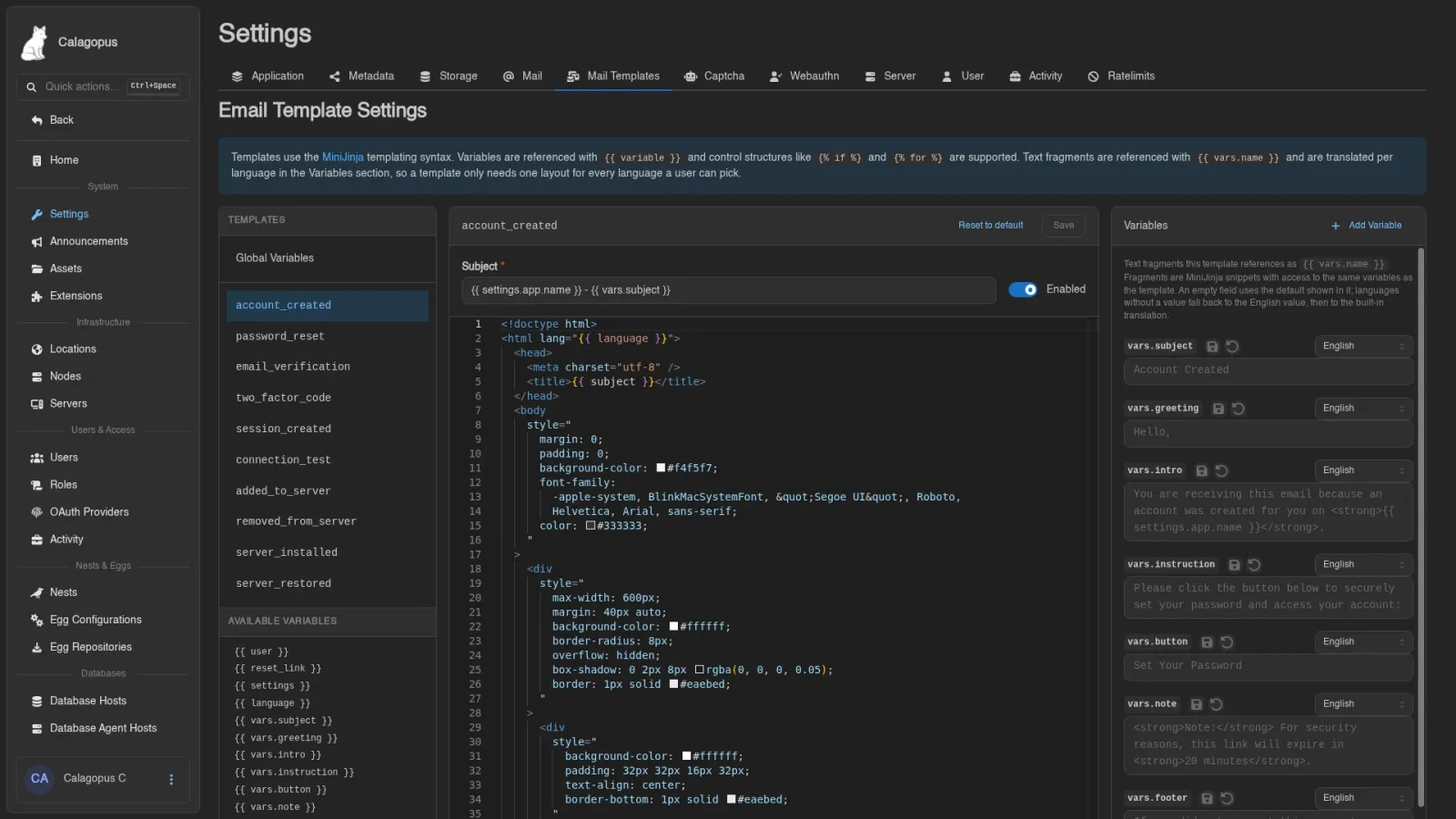
From there they can:
- See the list of all registered templates (core and extension-provided), each labeled by its identifier
- See the available variables for each template, so they know what they can reference
- Toggle a template on or off (independently of the default) - disabled templates are silently skipped at send time
- Edit the subject line, replacing your default with their own customized version (the subject supports the same MiniJinja syntax as the body)
- Edit the body content, replacing your default with their own customized version
- Reset the subject and/or content back to the default at any time
- Edit every variable per language, add custom variables, and reset a variable back to your defaults
Overrides are per-template and stored in the Panel's database, so they persist across restarts and are shared across panel instances. Resetting a subject or body clears the stored value, so the template falls back to whatever default_subject / default_content your current release ships, immediately and on every later release too. (Panels before 1.2.3 copied the default text into the row instead, which froze it at that version.)
Where to Go From Here
Most extensions only need add_template, add_template_variables and send_template - the rest of this is for less common cases. If you're shipping a feature that sends email, register a template, write your default HTML and subject in English with the wording in variables, and use it. The override and translation flow happens for free.
A few things this page didn't cover that you might want to look into separately:
- Triggering sends from background tasks. Nothing about email is route-specific - you can call
state.mail.send_templatefrom aBackgroundTaskBuildertask or aShutdownHandlerBuilderhandler the same way you'd call it from a route. See Background Tasks and Shutdown Handlers. - Per-recipient customization beyond the context. The MiniJinja context is per-call, so for things like "include this user's recent activity in the email," compute the activity, pass it as a variable, and render it in the template. That's standard usage; no special API.
- Conditionally suppressing sends. If you want users to opt out of certain emails (or operators to disable specific email types globally), the
default_enabledfield and the operator-facing enabled toggle handle the operator-global case. For per-user opt-out, check whatever flag you've set up on the user before callingsend_template- the email-template system doesn't have a built-in per-user suppression mechanism, but the call sites are your code anyway.