
Databases
Calagopus has two kinds of server databases. Classic Databases are single databases provisioned on a shared database host, the familiar setup from other panels. Managed Databases are full database instances run for you by DB Agent, with their own container, power controls, and live stats.
Both kinds count toward the same limit, shown at the top of the page as "6 of 15 maximum databases created."; the limit is part of the server's feature limits. The page splits into a Databases tab for classic databases and a Managed Databases tab at /databases/instances, each with its own search box and Create button.
A tab only appears when it's relevant to your server: classic when you have databases or a database host to create on, managed when you have instances or templates to create from. With only one relevant, the tab bar hides and you get a single plain list.

Pick a Kind
Single databases provisioned on a shared database host, the familiar setup from other panels.
See Classic Databases.
Data Explorer
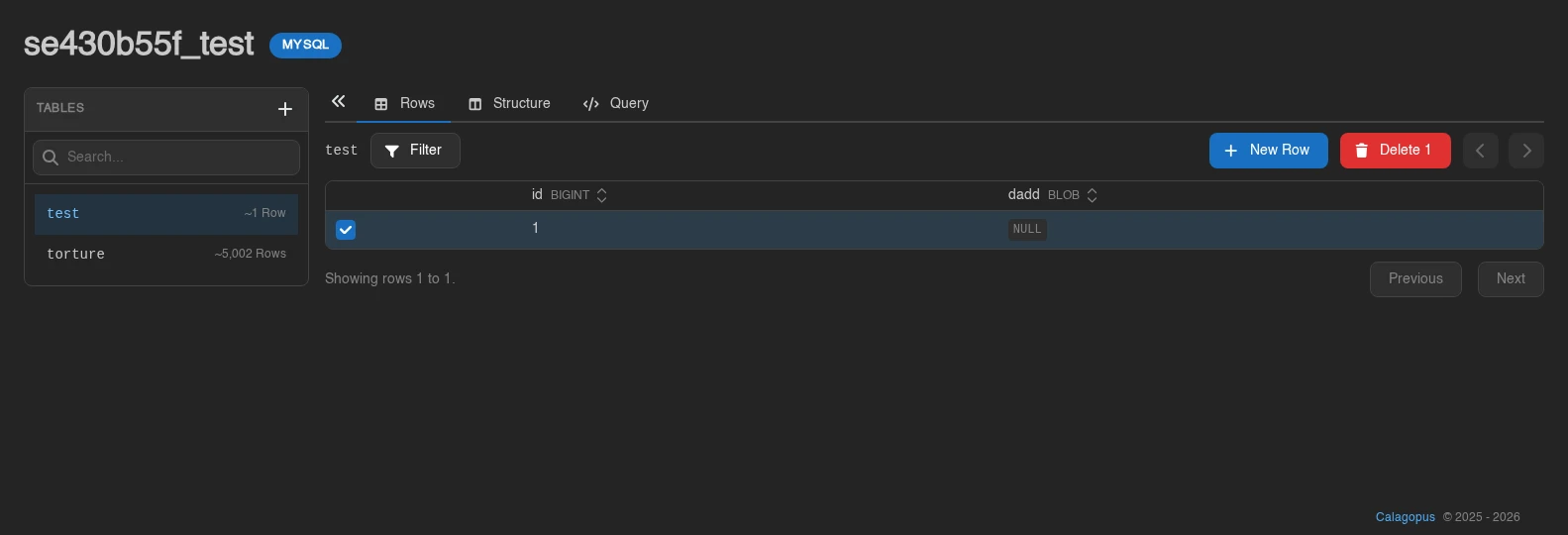
Explore Data on a classic database or on a database inside a managed instance opens a database browser built into the panel, no external tool needed. MongoDB databases cannot be explored, nor can Redis instances.
A searchable Tables sidebar (collapsible via Hide Tables) lists the database's tables with estimated row counts; views carry a View badge. Three tabs work on the selected table:
- Rows: browse with pagination and stackable column filters (equals, contains, starts with, greater or less than, and more); column headers show each column's type and sort the listing. Edit cells inline and hit Save, insert with New Row (columns can keep their Database default), or select rows and delete them after confirmation.
- Structure: the column list shows Name, Type, Nullable, Key, Default, and Attributes. Create tables (columns with Type, Nullable, Primary Key, and Auto Increment), add, rename, and delete columns, and rename or delete whole tables; deleting a table or column permanently destroys its data, and adding a non-nullable column to a table that already has rows fails.
- Query: a SQL console with syntax highlighting, a Row Limit (default 100), and Run. Read-only is on by default ("Rejects statements that change data or structure."); turn it off to run writes.
Editing Values
In Rows, the cell editor follows the column type:
| Column | Editor |
|---|---|
| Enum | Searchable list of the allowed values; column filters also offer these choices. |
MariaDB/MySQL SET | Multiple-choice selector. |
PostgreSQL boolean, or recognized MySQL tinyint(1) boolean values | True / False selector. |
| Date, time, timestamp, or year | Text input with an optional calendar or time picker. |
| Other types | Text input. |
These controls apply to table rows, not arbitrary SQL results in Query. Editing and deleting existing rows requires a primary key and is unavailable for views. A row with a truncated primary key is locked against changes. Use a database client to edit values the explorer cannot display in full.
Browsing needs the databases.query permission (database-instances.query inside instances); editing rows, editing structure, deleting structure, and the Query tab each map to their own key, see the Permissions Reference. Treat query-raw like handing out the database credentials themselves, and note that a database host in maintenance mode blocks the explorer entirely. SQLite files in the file manager get the same treatment via the files page.