
User Settings
The Settings page covers configuration the operator manages - one value for the whole installation, guarded behind the admin area. But plenty of things aren't the operator's call at all: which view mode a user prefers, a collapsed sidebar section, a per-user toggle your extension renders in its UI. Historically that kind of thing ended up in localStorage, which means it silently resets the moment the user opens the Panel on another device.
User settings fix that. They are a per-user key-value store on the Panel: values are arbitrary JSON, they sync across every device the user logs in on, and - unlike global settings - you don't declare a struct, register a deserializer, or write any backend code to add one. Pick a key, write a value, done.
How It Works
Every user has their own map of key -> JSON value, persisted by the Panel and served at /api/client/account/settings. The frontend keeps a local replica so reads are instant (even before the network round-trip), writes apply optimistically and flush to the server in debounced batches, and other devices pick the values up when they load the Panel.
Because the browser is the source of truth for these values, the backend deliberately does not validate their shape - your frontend code validates on read with a zod schema and falls back to a default when the stored value is missing or malformed. Don't store anything here that the server must be able to trust.
Naming Your Keys
Keys are namespaced with ::, exactly like the global settings table. Use your extension identifier as the namespace so you can never collide with the Panel or another extension:
dev.example.myextension::view_modeBare namespaces such as app::, file_manager::, console::, dashboard::, server::, shortcuts:: and form_engine:: belong to the Panel itself - don't write into them.
Frontend API
Everything lives in @/lib/userSettings.ts. The main entry point is the useUserSetting hook - it reads reactively, parses with your schema, and returns a setter that syncs:
import { z } from 'zod';
import { useUserSetting } from '@/lib/userSettings.ts';

function MyExtensionPanel() {
  const [viewMode, setViewMode] = useUserSetting(
    'dev.example.myextension::view_mode',
    z.enum(['list', 'grid']),
    'list',
  );

  return <SegmentedControl value={viewMode} onChange={setViewMode} data={['list', 'grid']} />;
}
The setter also accepts an updater function (setViewMode((current) => ...)), like useState.
Outside components there are plain functions:
import { getUserSetting, removeUserSetting, setUserSetting, subscribeUserSetting } from '@/lib/userSettings.ts';

const mode = getUserSetting('dev.example.myextension::view_mode', z.enum(['list', 'grid']), 'list');
setUserSetting('dev.example.myextension::view_mode', 'grid');
removeUserSetting('dev.example.myextension::view_mode'); // deletes the synced key, or only this device's value if there is one
const unsubscribe = subscribeUserSetting('dev.example.myextension::view_mode', (value) => {
  // fires whenever the effective value changes, e.g. after a sync
});
Device-Local Values
Some preferences shouldn't follow the user around - anything derived from the hardware in front of them (touch input, installed software, attached audio devices). For those, write with setUserSettingLocal instead: the value is stored per device and never sent to the server, but reads through useUserSetting/getUserSetting work exactly the same, with the local value taking precedence. Once a key has a device-local value, plain setUserSetting and the useUserSetting setter keep writing to that device-local value rather than to the account, and removeUserSetting clears the device value first.
Users can also pin any synced setting to one device themselves, through the scope menu the Panel renders next to a setting's label:
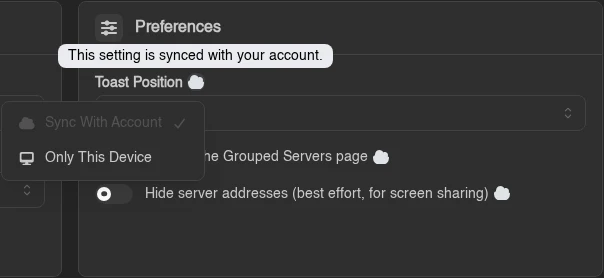
Three functions back that menu:
| Function | What it does |
|---|---|
overrideUserSettingLocally(key, value) | Pins a value to this device. No-op for keys in DEVICE_ONLY_SETTING_KEYS. |
clearUserSettingOverride(key) | Drops the device override, so the account value applies again. |
pushUserSettingToAccount(key) | Sends the current device value up as the new account value and clears the override. Async, and a no-op when there is no override or while impersonating. |
Backend Access
Extensions rarely need to read user settings server-side, but when they do, user.get_settings() returns the user's settings. Values deserialize into your own serde types on demand - no registration anywhere:
#[derive(serde::Deserialize, Default)]
#[serde(default)]
pub struct MyPrefs {
    pub view_mode: compact_str::CompactString,
}

let settings = user.get_settings(&state.database).await?;
let prefs: Option<MyPrefs> = settings.get("dev.example.myextension::prefs");
Reads are cached for 60 seconds per user and invalidated on write, so this is cheap to call from routes. The returned UserSettings is read-only and derefs to the raw key -> serde_json::Value map. To write, use user.get_settings_mut(&state.database) instead: it takes a per-user writer lock, derefs mutably so you insert/remove on the map directly, and persists everything (including removals) with settings.save(&state.database).
Rules of the Road
- JSON
nulldeletes. Sendingnullfor a key over the API removes it, sonullis not a storable value. Model "unset" as key absence and let your zod fallback handle it. - There are limits. Operators control how many keys a user may have and how large one value may be (
Max Synced SettingsandMax Synced Setting Size (bytes)in the admin user settings, 512 keys / 16 KiB by default). Store preferences, not documents. - Impersonation is read-only. While an admin impersonates a user they see the user's settings, but writes are rejected by the server and skipped by the frontend - an admin browsing around can't silently rewrite someone's preferences.
- Unbounded collections need one key. If you keep per-item flags (dismissals, expanded groups), store one map-valued key rather than one key per item, and prune stale entries when you write.