
Keyboard Shortcuts
Keyboard shortcuts let you navigate and interact with the panel without reaching for the mouse, grouped by where they apply: general, the file manager, the server console, and table navigation.
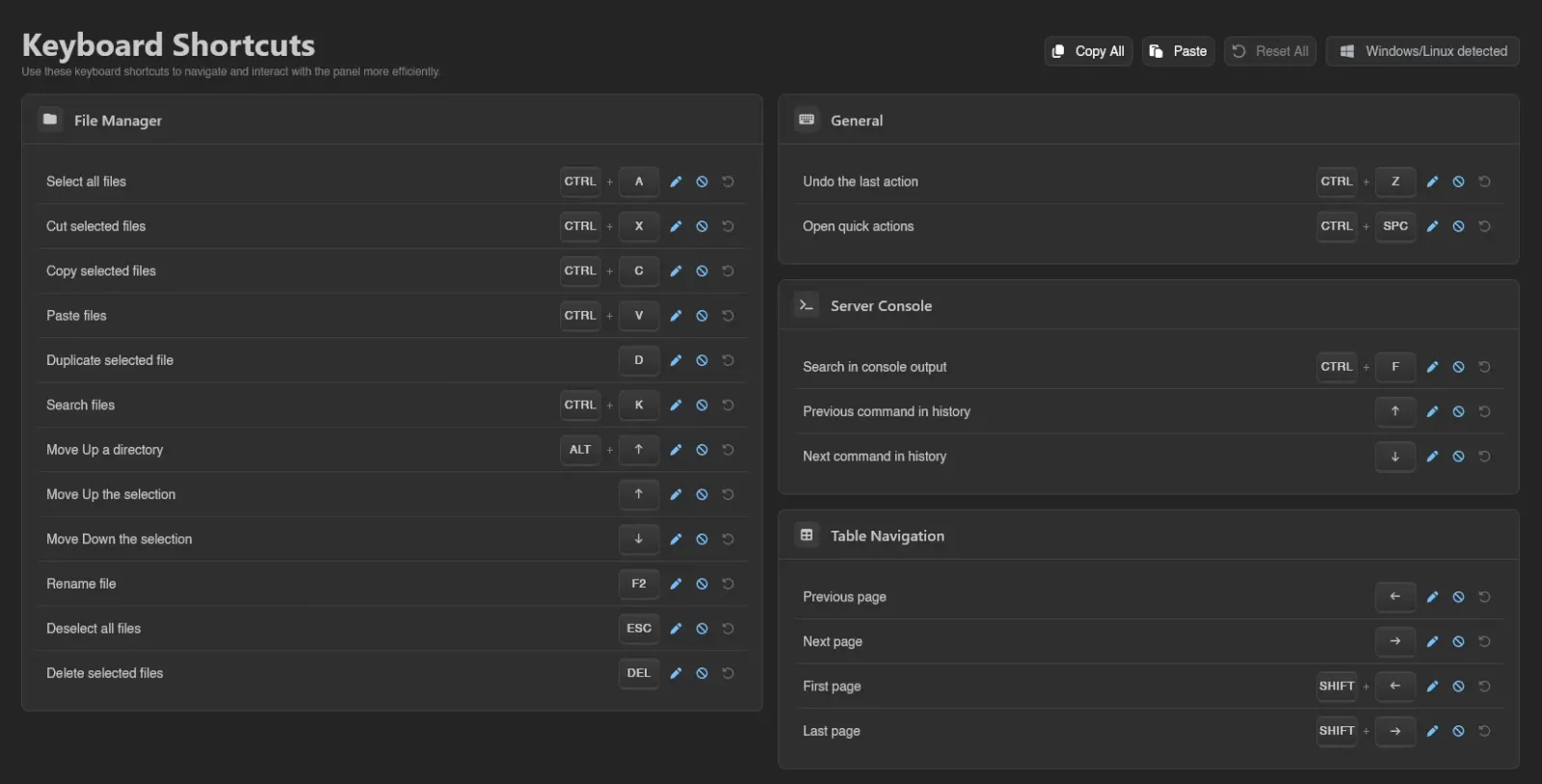
The panel detects whether you're on Windows/Linux or macOS and shows the matching modifier keys automatically.
Default Bindings
| General | Binding |
|---|---|
| Undo the last action | Ctrl+Z |
| Open quick actions | Ctrl+Space |
| File Manager | Binding |
|---|---|
| Select all files | Ctrl+A |
| Cut selected files | Ctrl+X |
| Copy selected files | Ctrl+C |
| Paste files | Ctrl+V |
| Duplicate selected file | D |
| Search files | Ctrl+K |
| Move Up a directory | Alt+↑ |
| Move Up the selection | ↑ |
| Move Down the selection | ↓ |
| Rename file | F2 |
| Deselect all files | Esc |
| Delete selected files | Del |
| Server Console | Binding |
|---|---|
| Search in console output | Ctrl+F |
| Previous command in history | ↑ |
| Next command in history | ↓ |
| Table Navigation | Binding |
|---|---|
| Previous page | ← |
| Next page | → |
| First page | Shift+← |
| Last page | Shift+→ |
| Select all rows | Ctrl+A |
| Deselect all rows | Esc |
(Ctrl shows as Cmd on macOS.)
Rebinding, Disabling, and Resetting
Each shortcut has three buttons next to it. The pencil rebinds: click it and press the new key combination, which is captured as soon as you press it; Esc aborts the recording. The circle-slash disables the shortcut (and flips to a play icon that re-enables it), and the reset button restores the shipped default. Anything that differs from its default carries a Modified badge.
Copy, Paste, and Reset All
The toolbar at the top shows which layout was detected ("Windows/Linux detected" or "macOS detected") next to three actions and a scope button:

- Copy All copies every current binding as text, in a format you can edit directly and paste back in to apply changes. It's also the easiest way to carry your keybinds over to another Calagopus panel: copy from one, paste into the other.
- Paste applies a previously copied (and optionally edited) set of bindings.
- Reset All restores every shortcut to its default at once.
The button at the end reads Account or This Device and controls where your rebinds live. By default they are saved to your account and follow you to every browser you log into - see Settings Sync. Copy and paste are still how you move bindings to a different panel.
# Calagopus keyboard shortcuts
#
# Edit the value after "=" then paste this back to apply your changes.
#   - a key combination such as  Ctrl+Shift+K  or  Mod+S  (Mod = Ctrl/Cmd)
#   - "disabled" turns the shortcut off
#   - "default" restores the shipped binding
# Lines starting with "#" and unknown ids are ignored.

[files] # File Manager
# Select all files
files.selectAll         = Mod+A
# Cut selected files
files.cut               = Mod+X
# Copy selected files
files.copy              = Mod+C
# Paste files
files.paste             = Mod+V
# Duplicate selected file
files.duplicate         = D
# Search files
files.search            = Mod+K
# Move Up a directory
files.moveUpDirectory   = Alt+ArrowUp
# Move Up the selection
files.moveUpSelection   = ArrowUp
# Move Down the selection
files.moveDownSelection = ArrowDown
# Rename file
files.rename            = F2
# Deselect all files
files.deselectAll       = Escape
# Delete selected files
files.delete            = Delete

[general] # General
# Undo the last action
general.undo            = Mod+Z
# Open quick actions
general.quickActions    = Mod+Space

[console] # Server Console
# Search in console output
console.search          = Mod+F
# Previous command in history
console.previousCommand = ArrowUp
# Next command in history
console.nextCommand     = ArrowDown

[table] # Table Navigation
# Previous page
table.previousPage      = ArrowLeft
# Next page
table.nextPage          = ArrowRight
# First page
table.firstPage         = Shift+ArrowLeft
# Last page
table.lastPage          = Shift+ArrowRight
# Select all rows
table.selectAll         = Mod+A
# Deselect all rows
table.deselectAll       = Escape