Reverse Proxy
This guide explains how to set up a reverse proxy for the Calagopus Panel running in Docker. Using a reverse proxy allows the internal web server (default port 8000) to be served securely over standard HTTP/HTTPS ports.
WARNING
Ensure that the Panel is already installed and running before continuing. Misconfigured proxy settings may make the Panel inaccessible.
INFO
We assume you already have Let's Encrypt certificates generated for your domain. All <domain> placeholders should be replaced with your actual domain name.
Before You Begin
Trusted Proxies
When running the Panel behind a reverse proxy, you must configure the APP_TRUSTED_PROXIES variable so the Panel logs correct client IP addresses.
services:
  panel:
    environment:
      APP_TRUSTED_PROXIES="172.18.0.1"
Container IP Address
The IP address your reverse proxy uses to reach the Panel depends on your Docker network and may differ on your system. Run the following command to detect it automatically:
docker inspect -f '{{range .NetworkSettings.Networks}}{{.IPAddress}}{{end}}' $(docker ps --format '{{.Image}} {{.ID}}' | awk '$1 ~ /^ghcr\.io\/calagopus\/panel/ {print $2}')The output (for example 172.18.0.1) is the address to use wherever the proxy configuration forwards traffic to the Panel.
Proxy Servers
WARNING
Before applying the configuration below, add the following map block to your main nginx.conf inside the http {} context (outside any server {} block). This ensures Connection: upgrade is sent only for WebSocket requests instead of all requests, preventing issues with multipart uploads and other standard HTTP traffic.
map $http_upgrade $connection_upgrade {
    default upgrade;
    ''      "";
}
Create /etc/nginx/sites-available/panel.conf (or /etc/nginx/conf.d/panel.conf on RHEL-based systems):
server {
    listen 80;
    listen [::]:80;
    server_name <domain>;
    return 301 https://$server_name$request_uri;
}

server {
    listen 443 ssl http2;
    listen [::]:443 ssl http2;
    server_name <domain>;

    access_log /var/log/nginx/calagopus.app-access.log;
    error_log  /var/log/nginx/calagopus.app-error.log error;

    sendfile off;
    # Maximum size for uploads and multipart requests
    # (e.g. 100M for allowing 100 MB uploads)
    client_max_body_size 100M;

    ssl_certificate     /etc/letsencrypt/live/<domain>/fullchain.pem;
    ssl_certificate_key /etc/letsencrypt/live/<domain>/privkey.pem;
    ssl_protocols       TLSv1.2 TLSv1.3;
    ssl_ciphers         HIGH:!aNULL:!MD5;
    ssl_prefer_server_ciphers on;
    ssl_session_cache   shared:SSL:30m;
    ssl_session_timeout 10m;
    ssl_session_tickets on;

    # See https://hstspreload.org/ before uncommenting the line below.
    # add_header Strict-Transport-Security "max-age=15768000; preload;";
    add_header X-XSS-Protection          "1; mode=block";
    add_header X-Robots-Tag              "noindex, nofollow" always;
    add_header Permissions-Policy        "camera=(), microphone=(), geolocation=(), fullscreen=(self), clipboard-read=(self)" always;
    add_header Referrer-Policy           "same-origin";

    location / {
        proxy_http_version 1.1;
        proxy_set_header Upgrade          $http_upgrade;
        proxy_set_header Connection       $connection_upgrade;
        proxy_set_header Host             $host;
        proxy_set_header X-Real-IP        $remote_addr;
        proxy_set_header X-Forwarded-For  $proxy_add_x_forwarded_for;
        proxy_set_header X-Forwarded-Proto $scheme;
        proxy_redirect off;
        proxy_buffering on;
        proxy_request_buffering on;
        # Make sure this IP matches your Panel container's IP address
        proxy_pass http://172.18.0.1:8000;
        proxy_pass_header Content-Security-Policy;
    }

    location ~ /\.ht {
        deny all;
    }
}server {
listen 80;
listen [::]:80;
server_name <domain>;
access_log /var/log/nginx/calagopus.app-access.log;
error_log /var/log/nginx/calagopus.app-error.log error;
sendfile off;
# Maximum size for uploads and multipart requests in bytes
# (e.g. 100M for allowing 100 MB uploads)
client_max_body_size 100M;
add_header X-XSS-Protection "1; mode=block";
add_header X-Robots-Tag "noindex, nofollow" always;
add_header Permissions-Policy "camera=(), microphone=(), geolocation=(), fullscreen=(self), clipboard-read=(self)" always;
add_header Referrer-Policy "same-origin";
location / {
proxy_http_version 1.1;
proxy_set_header Upgrade $http_upgrade;
proxy_set_header Connection $connection_upgrade;
proxy_set_header Host $host;
proxy_set_header X-Real-IP $remote_addr;
proxy_set_header X-Forwarded-For $proxy_add_x_forwarded_for;
proxy_set_header X-Forwarded-Proto $scheme;
proxy_redirect off;
proxy_buffering on;
proxy_request_buffering on;
# Make sure this IP matches your Panel container's IP address
proxy_pass http://172.18.0.1:8000;
proxy_pass_header Content-Security-Policy;
}
location ~ /\.ht {
deny all;
}
}Enabling Configuration
# On RHEL-based systems, placing the file in /etc/nginx/conf.d/ is sufficient as there is no symlink needed.
sudo ln -s /etc/nginx/sites-available/panel.conf /etc/nginx/sites-enabled/panel.conf
sudo systemctl restart nginx# You do not need to run any of these commands on RHEL-based systems.
sudo a2enmod rewrite headers proxy proxy_http proxy_wstunnel ssl http2
sudo a2ensite panel.conf
sudo systemctl restart apache2# You do not need to run any of these commands on RHEL-based systems.
sudo a2enmod rewrite headers proxy proxy_http proxy_wstunnel
sudo a2ensite panel.conf
sudo systemctl restart apache2systemctl restart caddyVerify Access
Visit https://<domain> in your browser. You should see the Panel login page served via your chosen proxy server.
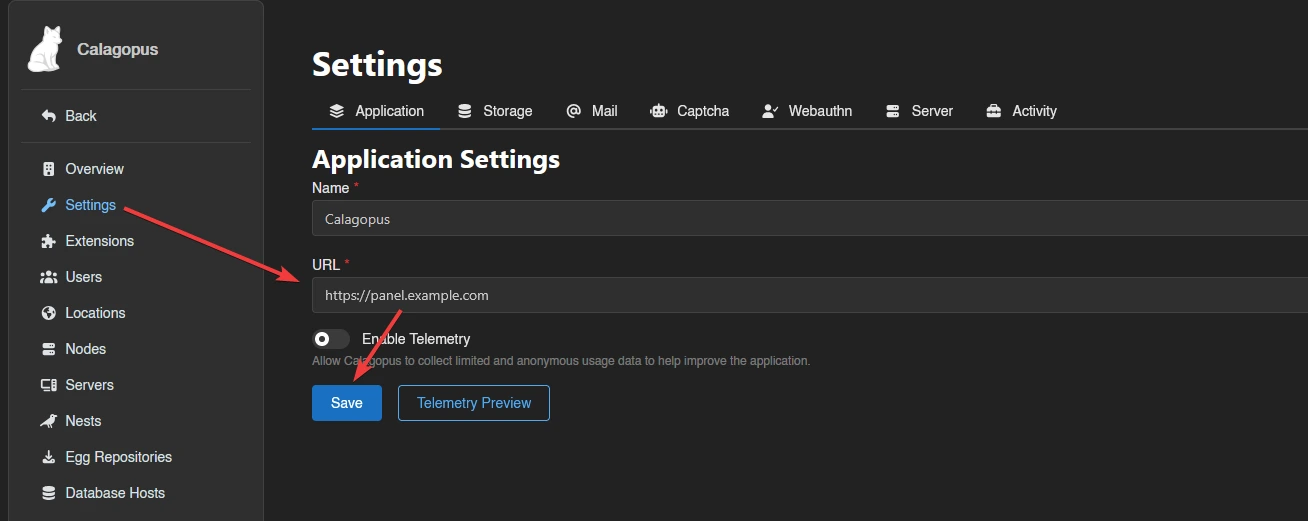
Set Server URL
After verifying access, go to your Panel’s Admin page, set the server URL, and click Save. This URL is used for links, API calls, and Wings node connections.